Frontend Programming: Basics of JavaScript and TypeScript
Hello World: Markup und DOM
<!DOCTYPE html>
<html>
  <head>
    <title>Hello World!</title>
  </head>
    <body>
      <div id="log"></div>
      <script>
          var element = document.getElementById("log");
          element.innerHTML = "<h1>Hello World</h1>";
      </script>
    </body>
</html>
Hello World: API
<!DOCTYPE html>
<html>
<body>
  <script>
    document.title = 'Hello World 3';
    var div = document.createElement('div');
    var h1 = document.createElement('h1');
    h1.textContent = 'Hello World';
    div.appendChild(h1);
    document.body.appendChild(div);
  </script>
</body>
</html>
Hello World: node
node -e "console.log('Hello World');"
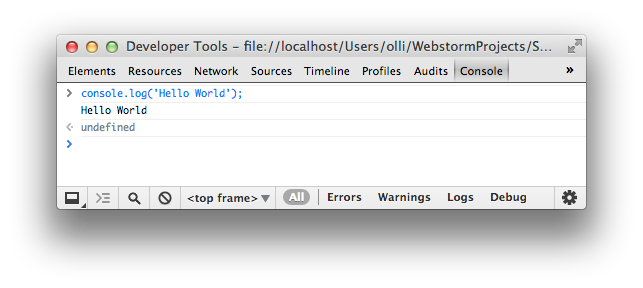
Hello World: DevTools
Object
let map = {
    feld1: 'Huhu',
    zweites$Feld: "Auch sowas geht!"
};
console.log(typeof map === "object"); // true
console.log(map.feld1); // Huhu
console.log(map["zweites$Feld"]); // possible as well

map.hund = "Ganz neu geht auch";
map.f = function() { return "Aha!" };

delete map.hund; // delete
console.log(map.hund); // undefined
Runtime Types
let string = "String";
typeof string === "string";

let int = 1;
typeof int === "number";

let float = 1.0;
typeof float === "number";

let bool = true;
typeof bool === "boolean";

let func = function() {};
typeof func === "function";

typeof doesNotExist === "undefined";
==, ===
// == tries conversions, will confuse you`
"dog" == "dog";
1 == true;
2 != false;
2 != true;
0 == false;
-1 != false;
-1 != true;
1 == "1";
1 == "1.0";

// === without conversion, always take this
"dog" === "dog";
1 !== true;
1 !== false;
1 === 1;
1 !== "1"
undefined and null
let obj = {
    a: null,
    b: undefined,
    d: "d",
    e: "e"
};

typeof obj.a; // => "object"
typeof obj.b; // => "undefined"
typeof obj.c; // => "undefined"

obj.d = null;
typeof obj.d; // => "object"

obj.e = undefined;
typeof obj.e; // => "undefined"
Array
let array = ["a", "b", "c"];
let el = array[2];
array[1] = 20;
typeof array === "object";
// adds 4
array.push(4);
// at pos 1 remove 2 elements
array.splice(1, 2);
// at pos 1 remove 0 elements and insert "x"
// Zudem wird an Position 1 "x" hinzugefügt
array.splice(1, 0, "x");
string
let s1 = 'Hallo, ';
let s2 = "Olli's Oma";

let s3 = s1 + s2;
s3 === "Hallo, Olli's Oma";

s3[1] === "a";
s3.charAt(1) === s3[1];
Functions
function f2() {
    console.log("Called!");
}
let result2 = f2();
result2 === undefined;

let f1 = function(p1, p2) {
    return p1 + p2;
};
let result1 = f1(1,2);
result1 === 3;
Build Process
- ES6, 7, 8 - und JSX-Code must be converted to ES 5/6
- Tools
- Babel (Compiler)
- Webpack (Bundler)
- Webpack Dev Sever (HTTP Server with Hot Reload)
ES2020: nullish coalescing operator
console.log(null || 'right');
// right
console.log(undefined || 'right');
// right
console.log("" || 'wrong');
// wrong
console.log(0 || 'wrong');
// wrong
console.log(false || 'wrong');
// wrong
console.log(null ?? 'right');
// right
console.log(undefined ?? 'right');
// right
console.log("" ?? 'wrong');
// ""
console.log(0 ?? 'wrong');
// 0
console.log(false ?? 'wrong');
// false
ES6: Classes
class Person {
    constructor(name) {
        this._name = name;
    }
    get name() {
        return this._name;
    }
}
class Programmer extends Person {
    constructor(name, language) {
        super(name);
        this.language = language;
    }
    code() {
        return this.name + " codes in " + this.language;
    }
}
const programmer = new Programmer('Erna', 'JavaScript');
console.log(programmer.code());
console.log(programmer instanceof Programmer); // true
console.log(programmer instanceof Person); // trueES6: Arrow Functions
const displayInPage = (text) => {
   return document.body.innerHTML +=
       `${text}
`;
};
const displayInPage = text => document.body.innerHTML += `${text}
`;
ES6: Extended Object Literals
const name = 'Oma';
const person = {
    // ES5: name: name
    name,
    // ES5: toString: function()
    toString() {
        return this.name;
    }
};
console.log(person.name); // Oma
console.log(person.toString()); // Oma
ES6: Modules, Imports und Exports
ES6: Export of a single class
// Person.js
class Person {
  // ...
}
export default Person;
ES6: Import
// Programmer.js
import Person from './Person';

export default class Programmer extends Person {
  // ...
}
ES6: Named Export and Import
// util.js
export function displayInPage(text) {
    document.body.innerHTML +=
        `${text}
` ;
}
// or
export { displayInPage };
import {displayInPage} from "./util";
displayInPage('Hello, World');
import {displayInPage as display} from "./util";
display('Hello, World');
import * as util from "./util";
util.displayInPage('Hello, World');
ES6: Destructuring of Objects
const person = {
  name: 'Olli',
  address: {
    city: 'Hamburg'
  },
  email: 'oliver.zeigermann@gmail.com'
};
const {name, notThere} = person;
console.log(`name=${name}`);
// name=Olli
console.log(`notThere=${notThere}`);
// notThere=undefined
const {address: {city}} = person;
console.log(`city=${city}`);
//city=Hamburg
ES6: Destructuring of Parameters
const person = {
  name: 'Olli',
  address: {
    city: 'Hamburg'
  },
  email: 'oliver.zeigermann@gmail.com'
};
function print({email: contact}) {
    console.log(`contact=${contact}`);
}
print(person);
// contact=oliver.zeigermann@gmail.com
function g({name: x, y, z=10}) {
  console.log(`x=${x}`); // x=olli
  console.log(`y=${y}`); // y=undefined
  console.log(`z=${z}`); // z=10
}
g({ name: 'olli' });
ES6: Destructuring of Arrays
const [a, b] = [1, 2];
console.log(`a=${a}`);
// a=1
console.log(`b=${b}`);
// b=2
const [, b] = [1, 2];
console.log(`b=${b}`);
//b=2
ES6: for..of
Iterate over everything that is 'iterable'
for (const e of array2) {
    console.log(e);
}
// Hi
// Olli
// how are you
// ?
ES6: Spread-Operator
Everything that is 'iterable' can be transformed into single parameters
const array1 = ['Olli', 'how are you'];
const array2 = ['Hi', ...array1, '?'];
console.log(array2);
// => ["Hi", "Olli", "how are you", "?"]
console.log(...array1);
// => Hi Olli how are you ?
ES2018: Spread in object literals
 const obj1 = { foo: 'bar', x: 42 };
 const obj2 = { foo: 'baz', y: 13 };
 const mergedObj = { ...obj1, ...obj2 };
 console.log(mergedObj)
 // { foo: "baz", x: 42, y: 13 }
ES6: Template Literals
Multi-Line String-Literals with Gaps
const person = 'Oma';
const language = 'Haskell';

console.log(`${person} programs
${10 * 1024 * 1024} lines of code
in ${language}.`);
// Output:
// Oma programs
// 10485760 lines of code
// in Haskell.
Tagged Template Literals
Mini-DSLs: Template-Literals with tag
const expanded = tag`${person} codes in ${language}.`;
console.log(expanded);
//whatever you want
function tag(strings, ...values) {
console.log(strings);
//[ '', ' codes in ', '.' ]
console.log(values);
//[ 'Oma', 'Haskell' ]
return 'whatever you want';
}
fetch
Browser API to load and save data
fetch as a simple GET
const url = `${BACKEND_URL}${path}`;

    fetch(url)
        .then(response => response.json())
        .then(json => /* ... */)
        .catch(ex => console.error('request failed', ex));
fetch sending JSON using POST
const url = `${BACKEND_URL}${path}`;
const objectBeSaved = ...;

fetch(url, {
    method: 'POST',
    headers: {
        'Accept': 'application/json',
        'Content-Type': 'application/json'
    },
    body: JSON.stringify(objectBeSaved)
})
.then(json => response.status === 201 ? /* success */ :
                                        /* failure */)
.catch(ex => console.error('request failed', ex));
Promises
A Promise will resolve to a value, be rejected or abort with an error
- If it resolves this might be right now or in the future
- In any case a reaction will be asynchronous
fetch with async/await
async/await recommended alternative to explicit Promise
async function loadGreetings() {
  try {
    const response = await fetch('http://localhost:7000/greetings');
    const json = await response.json();
    // success: do something with json
  } catch (err) {
    console.error("Loading failed: ", ex);
  }
}
Why using type systems?
type systems make code easier to maintain
type annotations / inferred types
- can make code more readable
- can make code easier to analyse
- can allow for reliable refactoring
- can allow for generally better IDE support
- can catch some (type related) errors early
Anders Hejlsberg@Build2016: Big JavaScript codebases tend to become "read-only".
weak to strong and dynamic to static

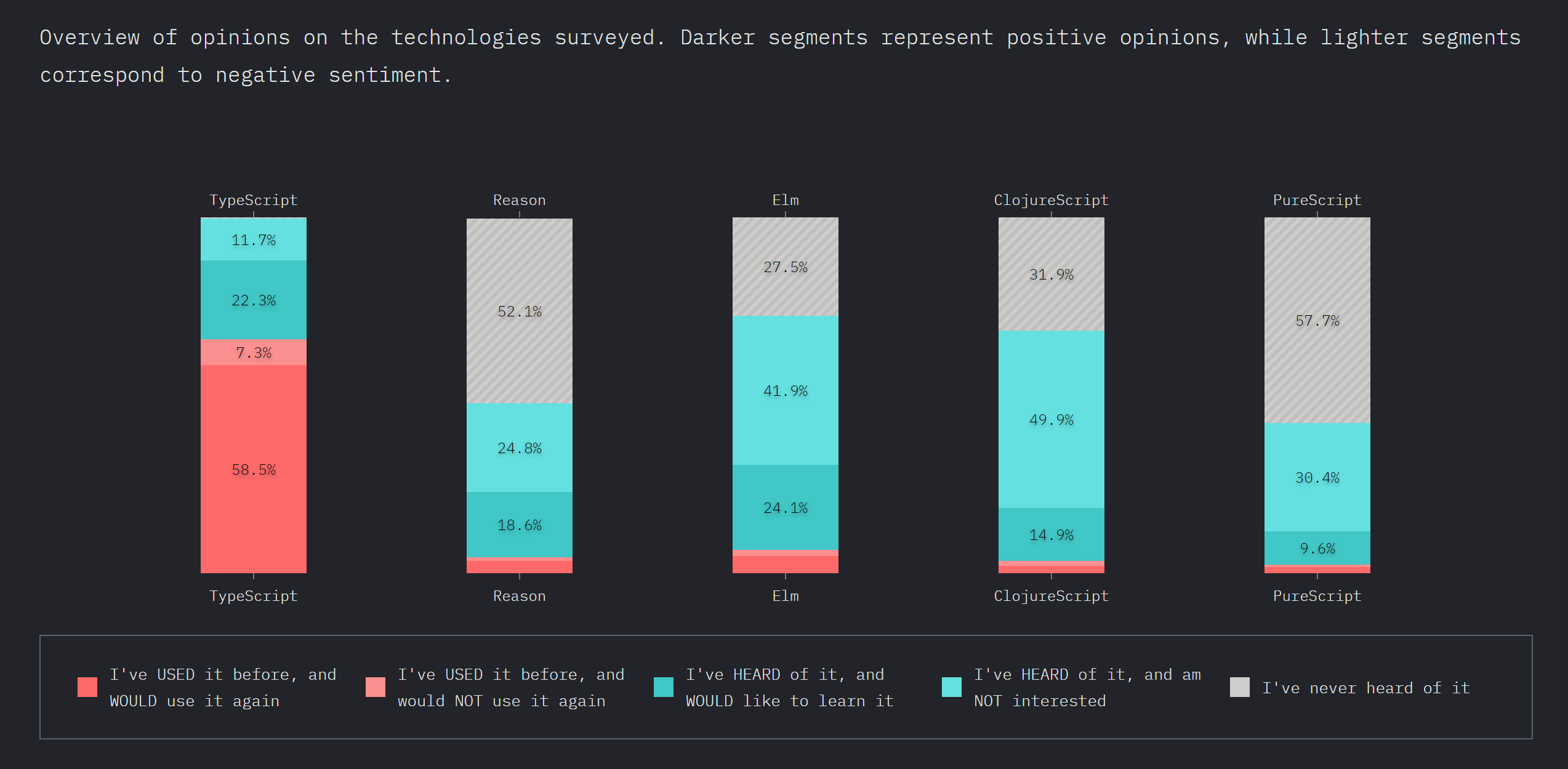
https://2019.stateofjs.com
Survey on the state of JavaScript
JavaScript flavors
TypeScript
ease of use and tool support over soundness
- By Microsoft (Anders Hejlsberg)
- Based on ES6/ES7/ES8/ES9/ES10
- Adds optional type annotations, visibility, and decorators
- Compiler checks and removes annotations
- External declarations can add type information to pure JavaScript
- Extensive support in Visual Studio Code and IntelliJ / Webstorm
- supporting people from Java and C# land
Basics
// variables can have type information
let foo: string;
foo = 'yo';
// Error: Type 'number' is not assignable to type 'string'.
foo = 10;
// types can be inferred (return type)
function sayIt(what: string) {
return `Saying: ${what}`;
}
const said: string = sayIt(obj);
class Sayer {
what: string; // mandatory

constructor(what: string) {
    this.what = what;
}

// return type if you want to
sayIt(): string {
    return `Saying: ${this.what}`;
}
}
Nullability
One of my main sources of runtime exceptions when programming Java
Even after many years it is still surprising how many corner cases I miss in complex code
TypeScript
function foo(num: number) {
  if (num > 10) {
    return 'cool';
  }
}
// check required
const fooed: string|void = foo(11);
if (fooed) {
  fooed.toString();
}
// or tell the compiler we know better (in this case we actually do)
fooed!.toString();
Types are non-nullable by default in TypeScript
All types nullable by default in TypeScript 1.x
Generic Type information
Types can be parameterized by others
Most common with collection types
let cats: Array<Cat> = []; // can only contain cats
let animals: Array<Animal> = []; // can only contain animals
// nope, no cat
cats.push(10);
// nope, no cat
cats.push(new Animal('Fido'));
// cool, is a cat
cats.push(new Cat('Purry'));
// cool, cat is a sub type of animal
animals.push(new Cat('Purry'));
TypeScript allows for birds and dogs to be cats here :)
let cats: Array<Cat> = []; // can only contain cats
let animals: Array<Animal> = []; // can only contain animals
// error TS2322: Type 'Animal[]' is not assignable to type 'Cat[]'.
//  Type 'Animal' is not assignable to type 'Cat'.
//    Property 'purrFactor' is missing in type 'Animal'.
cats = animals;
// wow, works, but is no longer safe
animals = cats;
// because those are now all cool
animals.push(new Dog('Brutus'));
animals.push(new Animal('Twinky'));
// ouch:
cats.forEach(cat => console.log(`Cat: ${cat.name}`));
// Cat: Purry
// Cat: Brutus
// Cat: Twinky
The flipside
This code is safe (as we access cats in a readonly fashion)
function logAnimals(animals: Array<Animal>) {
  animals.forEach(animal => console.log(`Animal: ${animal.name}`));
}

logAnimals(cats);
- This works in TypeScript (and it should)
- however, potentially not safe, there is nothing to keep us from writing to cats
much despised Java generics excel here as they can actually make that code safe (another difference: Use-site variance )
// Java
void logAnimals(List<? extends Animal> animals) {
  animals.forEach(animal -> System.out.println("Animal: " + animal.name));
  // illegal:
  animals.add(new Animal("Twinky"));
}
Union Types
aka Disjoint Unions aka Tagged Unions aka Algebraic data types
to describe data with weird shapes
depending on some data other data might apply or not
// a disjoint union type with two cases
type Response = Result | Failure;

type Result = { status: 'done', payload: Object }; // all good, we have the data
type Failure = { status: 'error', code: number}; // error, we get the error code
Implementation in TypeScript
function callback(response: Response) {
  // works, as this is present in both
  console.log(response.status);
  // does not work,
  // as we do not know if it exists, just yet
  console.log(response.payload); // ERROR
  console.log(response.code); // ERROR
  switch (response.status) {
    case 'done':
        // this is the special thing:
        // type system now knows this is a Result
        console.log(response.payload);
        break;
    case 'error':
        // and this is a Failure
        console.log(response.code);
        break;
  }
} any type
can be anything, not specified
can selectively disable type checking
function func(a: any) {
  return a + 5;
}
// cool
let r1: string = func(10);

// cool
let r2: boolean = func('wat');
- explicit any supported, but any never inferred
- try to avoid
Structural vs Nominal Typing
- Nominal Typing: types are compatible when their declared types match
- Structural Typing: types are compatible when their structures match
- Java, C#, C++, C all use nominal typing exclusively
- Flow classes are also treated as nominal types
- TypeScript classes are treated as structural types
- Everything else in both Flow and TypeScript uses structural typing
- Elm always uses structural typing with exact matches on Records
Structural Typing for Interfaces
interface NamedObject {
  name: string;
}

// this is fine as nominal typing only applies to Flow classes
let namedObject: NamedObject = dog;

// same thing, also fine
let namedObject: NamedObject = {
  name: "Olli"
};

// not fine in either, missing name
let namedObject: NamedObject = {
  firstName: "Olli"
};
Structural Typing for classes
class Person {
  name: string;
}

class Dog {
  name: string;
}

let dog: Dog = new Dog();

// yes, correct, as structurally compatible
let person: Person = dog;

// same thing, also correct
let person: Person = {
  name: "Olli"
};
Some Type Inference Magic
Consider
class Dog { woof() { } }

const animals = [];
animals.push(new Dog());
both TypeScript and Flow know this is safe, as we have only added Dogs so far
animals.forEach((animal: Dog) => animal.woof());
Adding Cats later and thus changing array type later
class Cat { meow() { } }
animals.push(new Cat());
does not affect TypeScript (correct), but makes Flow fail
Classes in TypeScript
TypeScript has special support for classes
Similar features can be found in Java/C++/C#
- abstract classes and methods
- special shortcut constructors (combined definition of fields and initialization)
- public, private, protected
- decorators (aka Attributes in C# and Annotations in Java)
- readonly properties like in C#
Should you use a type checker?
- don't be fooled: checkers do not make your programs error free
- there seems to be little or no impact on productivity
- initial effort to introduce a checker is low, though
- but a type system is a complex thing, it comes at a cost
My biased recommendation
- your project does not live for long: no
- your project is really simple: no
- there is a chance you will need to refactor the thing: yes
- your system is very important or even crucial for the success of your company: yes
- people enter or leave your team frequently: yes
- you have substantial amount of algorithmic code: yes